
Download Right Triangle APK – right triangle calculator, triangle solver, hypotenuse calculator, geometry tool, construction math app
Overview
Right Triangle is a dedicated desktop application designed to simplify the calculation of sides and angles in right-angled triangles. The software serves as a practical geometry tool for users who need to solve triangle-related problems efficiently. It is particularly useful in fields such as construction, engineering, and DIY projects where accurate measurements are critical. The app enables users to input known values—such as two sides or one side and one angle—and instantly computes the missing dimensions. This functionality supports real-world tasks like determining diagonal measurements for framing, calculating slope angles for landscaping, or verifying structural alignments. The developer, Ruval Enterprises, has focused on delivering a streamlined experience without unnecessary complexity. The application is built for simplicity and speed, making it accessible to both professionals and non-technical users. It is available as a free download with no advertisements or in-app purchases. The software’s core purpose is to provide a reliable, instant solution for right triangle computations, eliminating the need for manual calculations or external tools.
Key Features & Capabilities
- Real-time hypotenuse calculation – As users enter side values, the hypotenuse updates instantly, enabling immediate feedback during input.
- Angle and side solver – Users can input any two known values (e.g., two sides or one side and one angle) to derive the remaining unknowns.
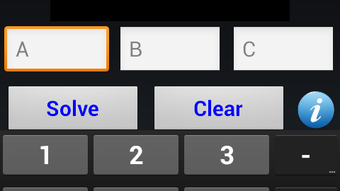
- Intuitive input interface – The layout is designed for ease of use, with clearly labeled fields and straightforward navigation.
- Swipe-based value adjustment – A gesture-based function allows users to increase or decrease values by increments of 10, 1, or 0.1, enhancing input speed and precision.
- Ad-free and no in-app purchases – The application remains fully free of advertisements and monetization attempts, ensuring an uninterrupted user experience.
These features support practical workflows such as measuring diagonal lengths for wall framing, calculating incline angles for garden beds, or verifying right angles in carpentry. The real-time computation reduces the risk of input errors and accelerates project planning. The swipe functionality is especially helpful when fine-tuning measurements, allowing users to quickly adjust values without retyping. The app’s focus on essential functionality ensures that users are not distracted by unnecessary options or complex menus. This makes it ideal for on-site use where speed and accuracy are paramount.
User Interface, Workflow & Performance
The user interface of Right Triangle is minimalistic and task-focused, emphasizing clarity and usability. Navigation is direct, with input fields clearly labeled and organized for efficient data entry. The layout supports a linear workflow: users enter known values, and the app displays computed results in real time. The absence of complex menus or hidden settings contributes to a smooth and predictable experience. The software’s performance is optimized for responsiveness, with immediate updates to calculations as inputs change. This ensures that users receive instant feedback, which is critical in time-sensitive environments like construction sites or field surveys. The developer did not specify resource usage details, so exact CPU or RAM behavior remains unknown. However, based on the app’s lightweight purpose and interface design, it is expected to operate efficiently on most modern devices. Stability appears to be consistent, as the app maintains functionality without reported crashes or freezes. The real-time calculation engine suggests a reliable backend process, though specific performance benchmarks were not provided.
Compatibility & System Requirements
Right Triangle is designed for Android-based devices. The application is available on the Google Play Store and is compatible with Android operating systems. The developer did not provide specific version requirements or hardware specifications. Installation size information was not disclosed. The software’s compatibility with different Android versions or device types remains unspecified. The developer did not list exact system requirements, so users should ensure their device meets general Android standards for running applications. Platform compatibility information is limited to Android, and no support for Windows, Mac, or other desktop operating systems was mentioned. Users should verify device compatibility through the Google Play Store before downloading. The app is intended for mobile use, though its functionality could be adapted to desktop environments if a compatible version were available.
Pros and Cons
Pros
- Free to download and use with no ads or in-app purchases
- Real-time calculation updates for immediate feedback
- Simple, intuitive interface with minimal learning curve
- Swipe-based input adjustment for faster, precise value entry
- Accurate and reliable for solving right triangle problems
Cons
- No information provided about system requirements or device compatibility beyond Android
- Limited to right triangle calculations—no support for other triangle types
- No offline mode confirmation; depends on app availability
- Missing advanced features like export, history, or graphing
- Not available on desktop platforms such as Windows or Mac
FAQ Section
Is Right Triangle available for Windows or Mac?
The software is currently available only for Android devices. There is no official desktop version for Windows or Mac as of now.
Does Right Triangle require an internet connection?
The app functions as a standalone tool. While it is distributed via the Google Play Store, no internet connection is required once installed for basic calculations.
Is the app safe to download?
Right Triangle is available on the Google Play Store, which provides security checks for apps. The developer, Ruval Enterprises, has not included ads or third-party tracking, which enhances its safety profile.
How often is Right Triangle updated?
Update frequency was not specified by the developer. Users should check the Google Play Store for the latest version and release notes.
What type of license does Right Triangle use?
The app is free to use with no restrictions. It is distributed under a free, ad-free license model with no in-app purchases or subscription requirements.
Final Thoughts + CTA
Right Triangle delivers a focused, reliable solution for anyone needing to solve right triangle problems quickly and accurately. Its minimalist design, real-time calculations, and swipe-based input make it a standout tool in the geometry and measurement category. While it lacks desktop support and advanced features, its core functionality is executed flawlessly. It is especially valuable for construction workers, engineers, students, and DIY enthusiasts who require on-the-go precision. The absence of ads and in-app purchases enhances its usability and trustworthiness. For users who need a simple, effective triangle solver, this app is a top choice. Download Right Triangle now to simplify your geometry tasks with confidence.
Download Right Triangle APK now




.png)


